Product Summary
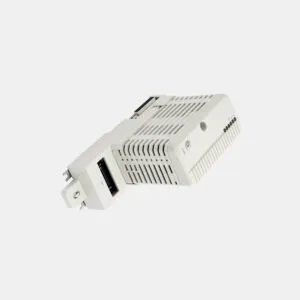
The 1747-UIC SLC 500 USB to DH-485 Interface Converter bridges modern computers to legacy automation networks. It provides a direct, isolated link to DH-485 ports. This unit draws power from a USB port. It operates reliably between 0 and 60 degrees Celsius. Engineers use it for fast programming and data monitoring.
Product Procurement & Buyer Guide
The Core Value of the 1747-UIC
This module solves a critical legacy connectivity problem. It eliminates the need for old serial ports on new laptops. The 1747-UIC converts USB signals to DH-485 protocol directly. It supports controllers like SLC 500 and MicroLogix. This unit also connects to PanelView terminals easily.
Technical Specifications You Need
You must match this converter to your system requirements. It uses a communication rate of 19200 bits/second. The USB port provides power with minimal current draw. It consumes under 100 mA from the USB bus. The backplane draws 600 milliamps at 5 Volts. It also draws 90 milliamps at 24 Volts.

Port Configuration and Connectivity
The 1747-UIC includes multiple ports for flexible integration. It has one USB port and a DH-485 port. The unit also features an RJ-45 Ethernet port. This port connects directly to SLC 5/01 and 5/02 processors. It also works with AIC and PanelView terminals.
Electrical Isolation and Safety
This converter ensures safe operations for your network. It provides 500V DC circuit isolation between power and DH-485 common. This isolation protects sensitive computer hardware from ground loops. It maintains signal integrity during critical data transfers.
Environmental and Physical Data
You must consider the operating environment for durability. The 1747-UIC works in temperatures from 0 to 60 Celsius. Its dimensions are 109mm by 50.6mm by 31mm. The unit weighs only 1 pound (0.45 kilograms). This compact size fits easily into control cabinets.

Step-by-Step User & Installation Guide
Unboxing and Initial Inspection
Check the package contents before starting installation. Confirm you have the 1747-UIC converter unit. Verify the included USB cable is present for connection. Ensure the RJ-45 and DB9 connectors are available. Inspect the unit for any physical damage.
Connecting to a Computer
First, connect the USB cable to your computer port. The system will detect the new hardware automatically. Install the required driver software from Rockwell Automation. The USB port powers the device without a separate supply. Your computer must supply enough power for operation.
Establishing Network Communications

Next, connect the DH-485 cable to your controller network. Use the RJ-45 port for SLC 500 direct connections. The unit switches between DH-485 ports as needed. Set the communication rate to 19200 bits/second in your software. Ensure the network terminator is properly installed.
Verification and Troubleshooting
After connections are made, test the communication link. Open your programming software and attempt to go online. Verify the USB transfer speed reaches 12 Mbps effectively. If communication fails, check the cable connections first. You should also verify the driver is installed.
Logistics & Standard Packaging Details
Express delivery shipping is available via FedEx, UPS, and DHL. We also offer standard ground shipping for cost savings. Contact our sales team for bulk order quotes.