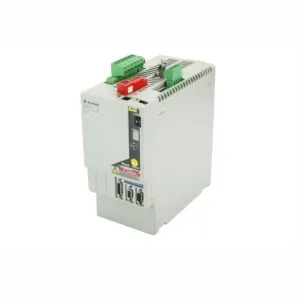
Product Summary
The 1794-ACN15 ControlNet adapter seamlessly integrates Flex I/O modules. It bridges your I/O data with the ControlNet network at up to 5 Mbps. This robust module also converts power for up to eight adjacent I/O units. It delivers reliable performance in demanding industrial environments.
Theme A: Product Procurement & Buyer Guide
This adapter solves the critical pain point of network integration. Engineers often struggle to connect distributed I/O to a ControlNet backbone. The 1794-ACN15 provides a single, reliable communication point. It supports up to eight modules, reducing cabinet space and wiring complexity.
Procurement managers value its durable design for harsh settings. The module withstands 30g operational shock and 5g vibration. It operates reliably from 0 to 55 degrees Celsius. This resilience minimizes downtime and lowers total ownership costs.
The adapter accepts a wide input voltage range of 19.2 to 31.2 Volts DC. This flexibility simplifies power supply selection in your facility. A maximum current draw of 450 mA ensures efficient energy use.
Its flexbus output delivers 640 mA maximum to power I/O modules. This power conversion capability is a key feature for system architects. It eliminates the need for separate power feeds to each module.
The module uses a single ControlNet port with Belden RG-6/U cable. This standard connection type ensures easy integration with existing network infrastructure. The adapter also features clear red/green status indicators for quick diagnostics.
Theme B: Step-by-Step User & Installation Guide
Start by mounting the module on a DIN rail or panel. Use a zinc-plated yellow-chromate steel rail for proper grounding. Ensure the enclosure is suitable for your specific environment and meets IP20 protection.
For wiring, use single wire connections sized 0.33 to 2.5 mm². This wire must be copper rated at 75 °C or greater. The maximum insulation thickness is 1.2 mm for a secure fit.
For double wire connections, use 0.33 to 1.3 mm² solid or stranded copper wire. Do not intermix solid and stranded wires in this configuration. The insulation must also be 1.2 mm maximum.
Keep power wiring length under 32.8 feet (10 meters) to maintain performance. Connect the module to a 24V DC supply within the 19.2 to 31.2V DC range. The module will handle an inrush current of 23 Amps for 2 milliseconds.
After power-up, observe the status indicators. A solid green I/O Status light confirms normal operation. Red lights indicate a fault on the network or I/O bus.

Logistics & Standard Packaging Details
We ship this unit via express delivery services. You can choose FedEx, UPS, and DHL for fast shipping.

Technical Specifications at a Glance
The module's storage temperature ranges from -40 to 85 degrees Celsius. This tolerance protects the unit during transport and storage. The compact dimensions of 87 x 94 x 69 mm save valuable panel space.
Troubleshooting Common Setup Issues
If the Comm A or Comm B lights remain red, check the ControlNet cable connection. Verify the cable is Belden RG-6/U or an approved equivalent. Also, confirm the network terminator is installed correctly.
If the I/O Status light is off, check the flexbus connection. Ensure the adjacent I/O modules are properly seated. Review the total current draw against the 640 mA maximum output.
Always install the module in a suitable enclosure for environmental protection. This practice ensures the unit meets its IP20 rating. It also prevents damage from debris or accidental contact.